

What’s supported
Supported actions
This connector supports:- Proxy Actions, using the base URL
https://api.monday.com. - Read Actions including historical backfill (incremental read will soon be supported)
- Write Actions
Supported Objects
The Monday connector supports reading from the following objects: The Monday connector supports writing to the following objects:Before you get started
This connector uses API Key authentication. You do not need to create a provider app in the Ampersand Dashboard.Create an API token for Monday
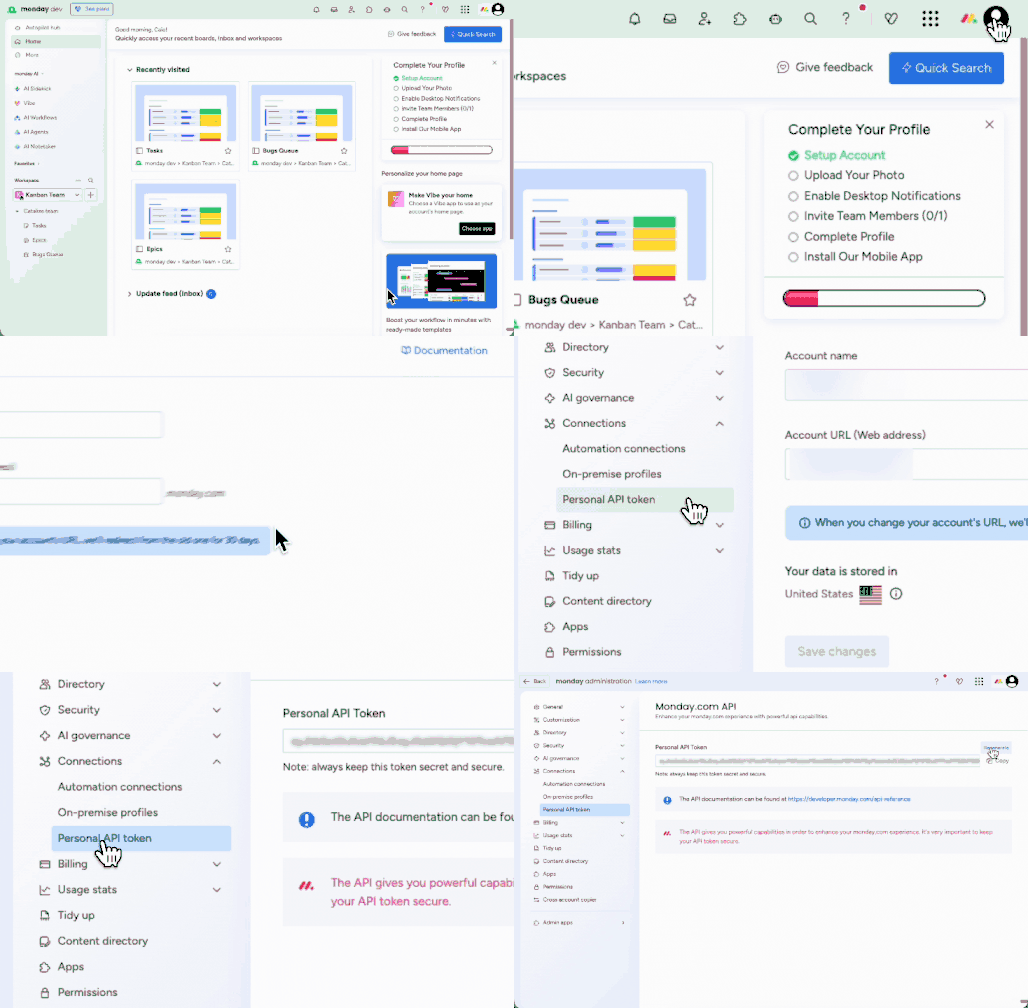
- In your monday.com account, click your profile picture in the top right corner.
- Select Developers. This will open the Developer Center in another tab.
- Click API token > Show.
- Copy your personal token and store it securely.
Using the connector
To start integrating with Monday:- Create a manifest file like the example.
- Deploy it using the amp CLI.
- If you are using Read Actions, create a destination.
- Embed the InstallIntegration UI component. The UI component will prompt the customer for their Monday API token.
- Start using the connector!
- If your integration has Read Actions, you’ll start getting webhook messages.
- If your integration has Write Actions, you can start making API calls to our Write API.
- If your integration has Proxy Actions, you can start making Proxy API calls.